

Driver swing analysis
Driver swing analysis with speed, plane and setup in one view.
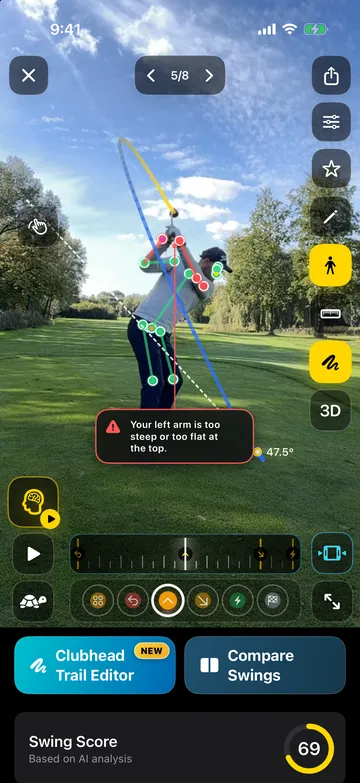
The driver is its own swing: a wider arc, the ball further forward, maximum speed. Pick the driver as your club and DeepSwing measures your checks against driver ideal ranges, estimates clubhead and ball speed and shows whether your setup matches the ball flight you want.

- 2speeds per swing
- mphor km/h
- Driverown ideal ranges
- 0radar needed
Speed
Clubhead and ball speed from video.
From a face-on recording DeepSwing estimates clubhead and ball speed at impact. Every reading lands in History with the club, so you see whether a technique change costs or adds speed.
- Speed at impact
- History per club
- No radar, no sensors
Driver checks
Ideal ranges for the big stick.
What is right with a 7-iron can be a fault with the driver. With the driver selected, the ideal ranges adapt, including the swing plane.
- Club-specific ideal ranges
- Setup and tilt
- Swing plane per club
Ball flight
Straight or curved?
The app derives tendencies like slice, hook or push/pull from your checks. With the driver those curves show the most, so looking at the cause pays off here in particular.
- Slice and hook tendency
- Clubhead path
- Ball flight tracer in the video

Straight shot for reference
Fitting
From your swing to the right driver.
Speed and tendencies feed the fitting: DeepSwing recommends clubs and balls with a fit score, price comparison and links to shops and catalogs.
- Fit score per model
- Price comparison
- Shop and catalog links
How it works
- 1
Pick the driver
Checks and ideal ranges switch to driver values.
- 2
Film your tee shots
Face-on for speed, from behind for the swing plane.
- 3
Read speed and technique
Speed, tendency and checks together, then look at the fitting.
What golfers say
4.6 out of 5 · 126 App Store ratings
-
★★★★★ App Store
Helpful AI analysis for better golf
I have been using DeepSwing for a few weeks and I love it. The app analyzes my swing, especially my tee shots, and shows me right afterwards what I can do better. Much better than ordinary video apps. …
Zubabua · Germany · Translated from German -
★★★★★ App Store
Game changer!
I have been using this app for several months and it has helped me so much. … One of the things I like most is that I can experiment with different grips or moves and see the impact immediately. … I have never hit the ball better and my consistency has improved dramatically.
JMDOS · Canada · -
★★★★★ Google Play
Nice app, really helped to find my issues
V. N. ·
Questions, answered
How does DeepSwing measure clubhead speed without radar?
The app tracks clubhead and ball through the frames around impact and estimates the speed from that. It works best filmed face-on, with a steady phone and in slow motion.
What is a good driver clubhead speed?
Male amateur golfers are often around 93 mph with the driver, tour players well above that. More important than a single number is your own trend.
Why is my driver worse than my irons?
The longer shaft, the flatter swing and the ball position amplify small faults. The driver ideal ranges show where your driver swing deviates.
Can DeepSwing help me stop slicing my driver?
Yes. The app shows over the top on the clubhead path and the body checks behind the slice tendency, each with a drill.
Does this replace a launch monitor?
No. A launch monitor measures ball data like spin and launch angle. DeepSwing shows the movement behind it and estimates speed from the video.
Related topics


Get more out of your driver.
Speed, swing plane and setup in one analysis. Try Pro free for 7 days.