

iPhone
Live Activity
Hole, recorded shots and Swing Score on the Lock Screen and in the Dynamic Island. One tap opens the camera.

iOS 3.3.0 · Android 1.4.0
Film your swing with your iPhone or Android phone. DeepSwing shows your Swing Score, 20+ checks, swing plane and clubhead speed. Plus the one drill that fixes your biggest fault.
Illustrative values. The 3D model is the reference swing from the app's 3D ghost.
Scroll to watch the swingA coach's eye in your pocket. DeepSwing breaks every swing down frame by frame, finds the fault that costs you the most strokes and hands you the drill for your next range session.
Launch Monitor beta · limited spots
Become a DeepSwing Pioneer: test the camera launch monitor before launch, at home, at the range and in mixed reality with Meta Quest 3.
 DeepSwing GolfNew
Our 3D golf game for iPhone, iPad, Mac and Android. You swing yourself, on screen or with your Apple Watch, and the ball flies with real physics over ten dream courses.
iPhone · iPad · Mac · Android · Apple Watch as the club

New · iOS 3.3.0 · Android 1.4.0 · Pro
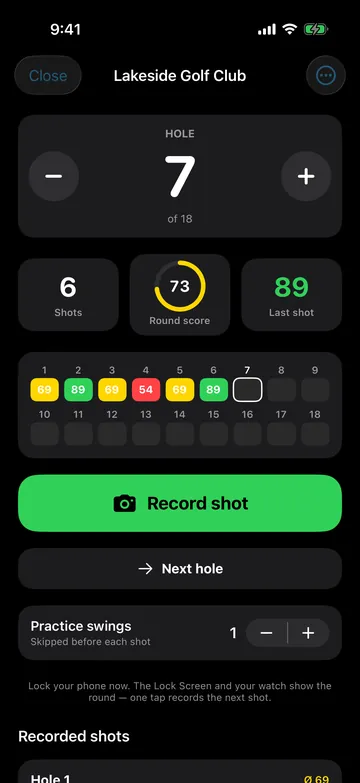
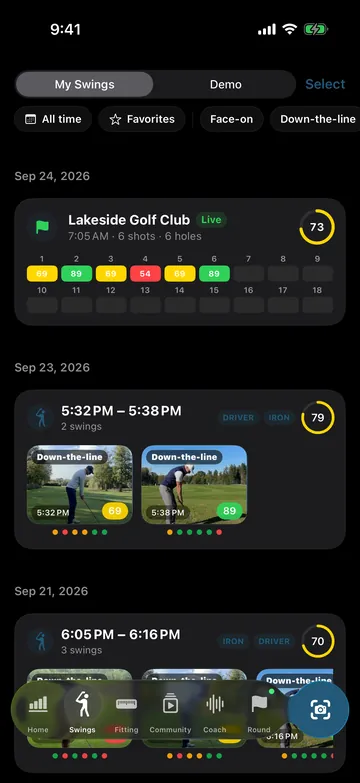
Play 9 or 18 holes. Every real shot is saved, analyzed in the background and assigned to its hole. Finally you can see whether your range swing holds up on the course.
Nearby via GPS or by name. Then start a 9- or 18-hole round.
You choose how many practice swings to skip. The shot that counts is the one that is saved.
Per hole and for the whole round. On-course rounds stay separate from your practice stats.
One tap on the Lock Screen and the camera is ready for your next shot.
Your round is always one glance away. Without unlocking your iPhone.
Hole, recorded shots and Swing Score on the Lock Screen and in the Dynamic Island. One tap opens the camera.
Start and end rounds, change holes, trigger the next recording. With complications and haptics.
Swing Score, last swing, training focus, streak, round and speed right on your Home Screen.
On Android, an ongoing notification takes you back to the round or straight to the next recording.
AI swing analysis
Automatic phases
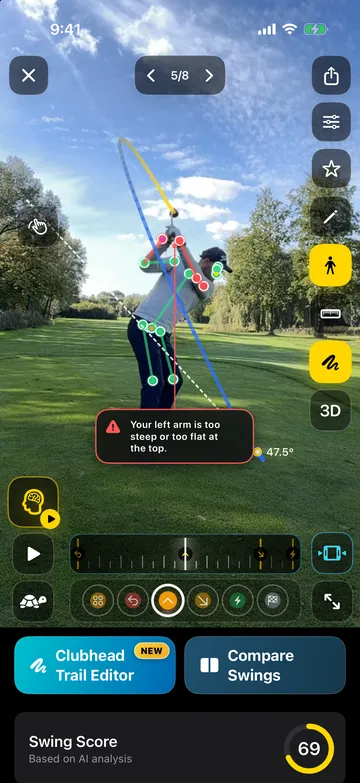
DeepSwing detects setup, backswing, top, downswing, impact and finish on its own. If a marker is off, drag it and reanalyze.
Swing Score
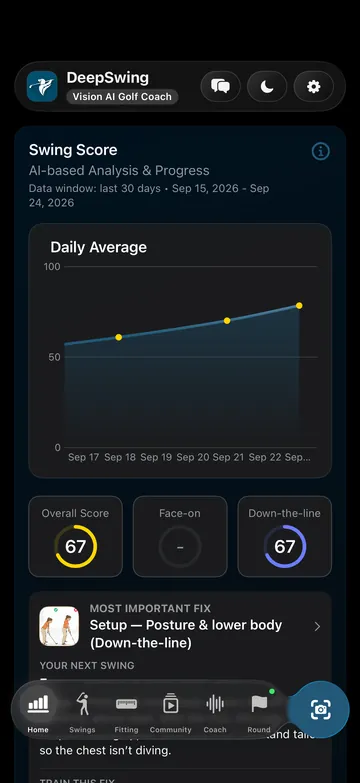
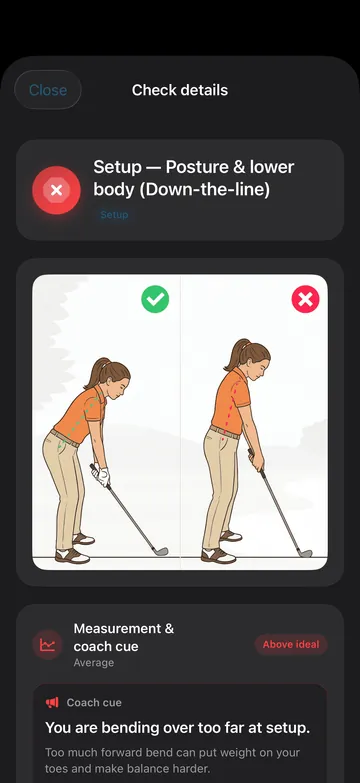
The Swing Score shows where you win and lose points. At the top sits the one fix that matters most, with the drill that goes with it.
Clubhead path
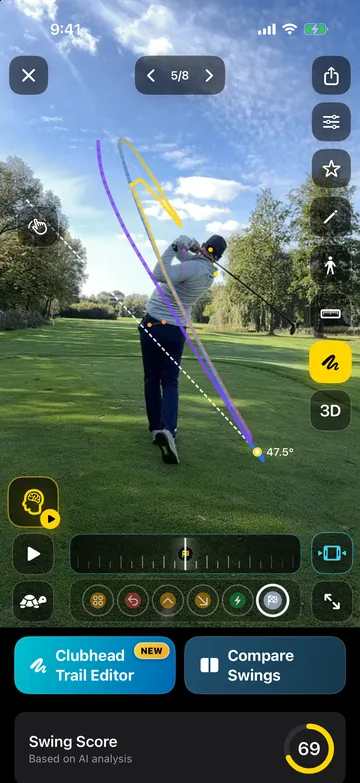
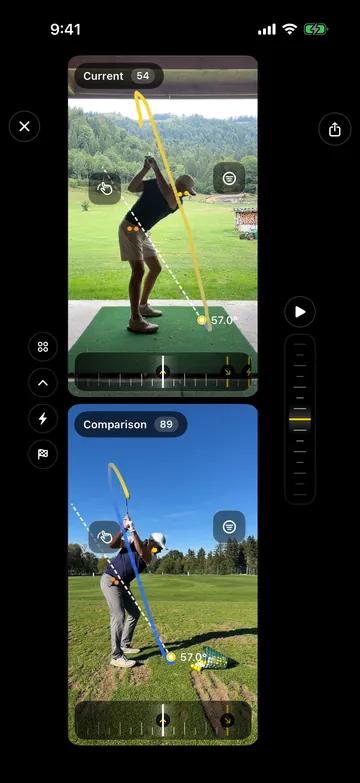
Swing plane, over the top, shaft lean and casting are measured from the detected clubhead path, not just from your body.
More on down-the-line analysis3D ghost
A 3D reference swing sits right on top of your video. You see every deviation instantly, no guessing.
Face-on and down-the-line. The right checks for each view. Face-on analysis
Clubhead and ball speed
DeepSwing estimates clubhead and ball speed at impact from a face-on video. With speed history per club, so you can see whether your practice is paying off.

Understand your miss
Pick your miss. The flight shows what it looks like, the diagram shows how it starts at impact, and below you see which checks DeepSwing looks at in your swing.

Straight shot for reference
DeepSwing looks at
DeepSwing looks at
DeepSwing looks at
Shown as the Push/Pull tendency in the app.
DeepSwing looks at
Shown as the Push/Pull tendency in the app.
DeepSwing looks at
DeepSwing looks at
Flights simplified, for right-handed golfers. DeepSwing measures body and clubhead motion, not the clubface itself: the app derives the tendency from your checks.
Training Coach
Answer three questions and get a weekly plan for your goal, your equipment and your level.
How to film, how to read your score, how to get going. Plain language instead of jargon.
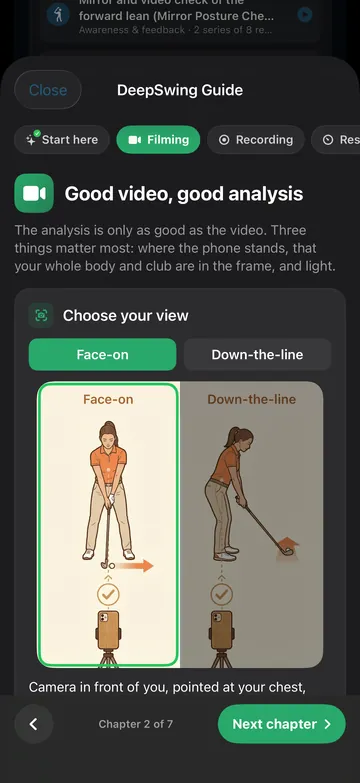
Videos with step-by-step instructions. Plus a library you can search any time.
Mobility and strength for your swing, with adjustments for common golf aches.
Beginners get a clear first step. Mid handicappers find the fault that costs strokes. Low handicappers and coaches get frame-exact detail.
Community
In the DeepSwing community, golfers share their swings straight from the app. Others watch them, like them and tell you what they would change. Swipe through the latest posts.
Live from the DeepSwing community. Join in the app with an account, 16 and up.
Loading swings …
Like, comment and post in the app.
Capture
Start the capture, swing when you are ready. DeepSwing detects the view, records by itself and trims the clip.
Real-time voice, visual and haptic cues while you practice.
Keep hitting, review later. Every swing lands in your history on its own.
Start recording, countdown and Live Coach from Apple Watch.
Stream to a second device. Ideal for coaches.
Record in slow motion or import videos from your library.
Compare and progress
Privacy
The core analysis runs right on your device. Your swing videos are not uploaded for it. Only what you choose to share is shared.
Game changer!
I have been using this app for several months and it has helped me so much. … One of the things I like most is that I can experiment with different grips or moves and see the impact immediately. … I have never hit the ball better and my consistency has improved dramatically.
This app is great to look at body mechanics, which are so valuable to understand when learning golf at ANY level. …
A great way into golf
As a beginner I find the app super helpful and feel really well supported. It is super easy to use and the explanations are clear and motivating. A great way into golf ☺️
Top app, nothing to complain about at this price, and I think the swing trails are cool too. I saw the app already existed for iPhone, cool that they released it for Android as well.
New update is great
The performance is excellent. The reworked Live Coach and the video player in particular are much clearer now and work smoothly. The other features are a great addition too and run reliably. …
Super helpful
I have played golf for years and always want to improve my swing. The app is super helpful because you can upload your own videos and analyze them right away. It recognizes the swing and gives really good tips for improving. Highly recommended!
Nice app, really helped to find my issues
Fun to use!
Downloaded the app to try it out. It does what it promises and has a nice, user-friendly interface.
A really great app!
I use DeepSwing at every practice session on the driving range alongside my pro. The analysis really helps me understand my swing, check changes right away and put what I have learned into practice. What I find especially helpful is that I no longer train by feel alone but get concrete feedback. …
Fantastic app!
Precise AI swing analysis, easy to use and extremely helpful. A clear recommendation for every golfer! ⛳️
Cheapest coach you can get
Not only does it analyse your swing and give improvement/correction suggestions. It also has an academy with lessons and community to connect with others. Only thing missing is analysis for left hand players but it’s not a blocker.
Since added: DeepSwing now analyzes left-handed golfers too.
Helpful AI analysis for better golf
I have been using DeepSwing for a few weeks and I love it. The app analyzes my swing, especially my tee shots, and shows me right afterwards what I can do better. Much better than ordinary video apps. …
Really good, and from now on I will take the app to the driving range whenever I remember. For everything it can do, the price is great too!
Strong app!!!
… I have tried a lot of apps like this and I think this one is the best. Strong analyses and recommendations. I can only recommend it!!!
Good
Very good app, it captures the swing automatically.
Shown: every written review with 4 or 5 stars from the App Store and Google Play. Long texts are shortened (…), spelling as in the original.
DeepSwing Pro
Pro unlocks the full result of every analysis and every feature: golf rounds, Live Coach, compare, exports and more.
Try every Pro feature with the yearly plan. For new subscribers.
With a free trial. The lowest price per month.
Flexible, cancel monthly.
Pay once, Pro forever.
You see prices in the app, in your local currency.
Subscriptions renew automatically unless cancelled at least 24 hours before the period ends in your App Store or Google Play account settings.
DeepSwing PriceFit
PriceFit compares prices for clubs and golf balls at verified golf shops in your market every day. Plus a free fitting for your swing and a bag builder for your budget.
Current, timestamped prices for drivers, woods, hybrids, irons, wedges, putters and golf balls, filtered by brand, model year and price.
Answer a few questions about your player profile, swing speed and typical miss, and see which models suit you. The fit score is not for sale.
Name your budget and PriceFit builds the best-fitting bag from current shop prices.
Open PriceFitFree in your browser.
Explore
FAQ
Downloading DeepSwing is free. The full result of every analysis and every feature come with DeepSwing Pro: yearly with a 7-day free trial for new subscribers, monthly, or a one-time lifetime purchase. You see prices in the app.
No. DeepSwing only needs your phone's camera. Clubhead and ball speed are estimated from a face-on video.
Set your phone up steadily, either in front of you (face-on) or behind you on the target line (down-the-line). Your whole body and the club need to be in frame. The starter guide in the app shows you step by step.
No, not for the analysis. The core analysis runs right on your device. Only what you export or share yourself is shared.
With Pro you start a 9- or 18-hole round, find your course by GPS or name and choose how many practice swings to skip. Every real shot is analyzed in the background and assigned to its hole.
iPhone with iOS 18 or later and Android phones with Android 10 or later. Apple Watch is optional.
Yes. DeepSwing analyzes right- and left-handed golfers.
Analysis, checks, speed, golf rounds and compare are on both platforms. Live Activities, widgets and the Apple Watch app are iPhone only. On Android, a notification takes you back to the running round, and supported devices record at 120 or 240 fps.
18 languages, including English, German, French, Spanish, Italian, Dutch, Swedish, Japanese, Korean and Chinese.


Get DeepSwing and try Pro free for 7 days.