Golf app for Apple Watch
Leave the iPhone in the bag.
DeepSwing turns the Apple Watch into a golf GPS: the distance to the center of the green in big numbers, front and back below, hazards, a club for the distance, the green heat map and your score. The watch uses its own GPS, so your iPhone can stay in your pocket. Walk to the next tee and it moves to the next hole on its own. Your first round is free.

 Coming soon Google Play
Free on iPhone, no subscription, no round limit. Apple Watch: your first round is free. Coming to Android
- 12,000+courses worldwide
- 3distances to every green
- Autonext hole by GPS
- 1stround free

How a round works
From the first tee
to the scorecard.
Scroll through a par 4: distances, green and score, the way you see them on the course.
-
01
Find your course.
Nearby via GPS, by name or on the globe. Then 9 or 18 holes.
-
02
Front, middle, back.
The distance to the green in big numbers, plus bunkers, water and how far you have to carry.
-
03
See where the green breaks.
The green heat map colors the heights from blue to red, arrows show the slope.
-
04
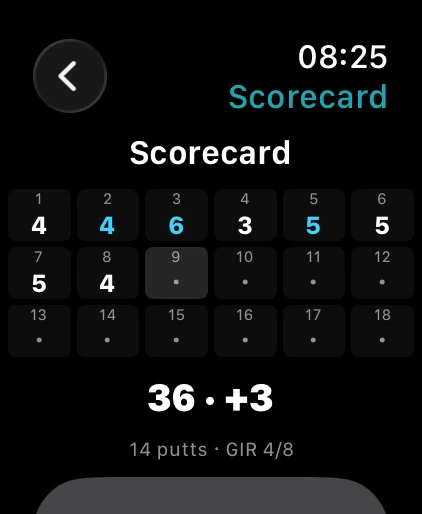
Score and handicap.
A scorecard for up to four players, Stableford and match play, your handicap index under the WHS.
Distances
Big numbers you can read at a glance.
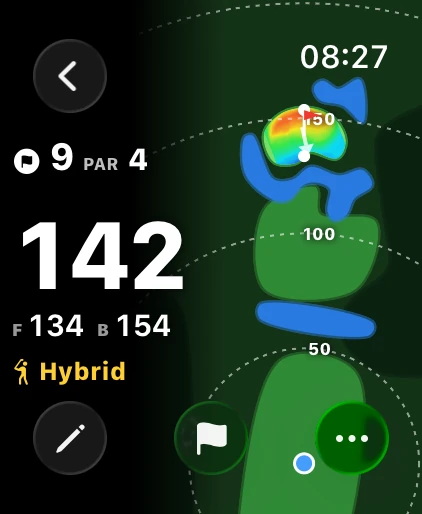
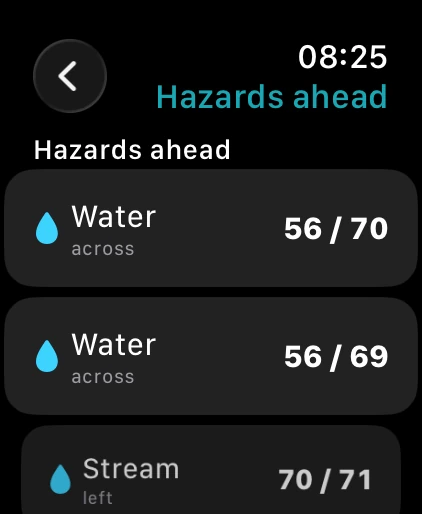
The main page shows the hole and par, the distance to the center of the green in big numbers, front and back below it, and the club for that distance. Next to it sits the map of the hole with distance rings. Under More you find the hazards ahead, with the distance to reach and to carry them.
- Front, center, back
- A club for the distance
- Hazards ahead
Green heat map
The slope on your wrist.
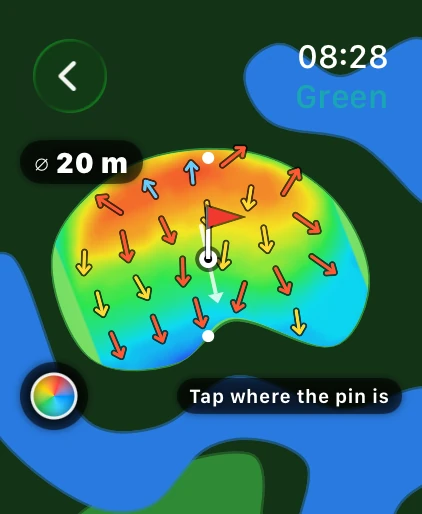
One tap opens the green as a heat map, from blue for low to red for high, with arrows pointing the way it falls, its diameter and your distance. Set the pin where it is today with a tap.
- Colors from low to high
- Slope as arrows
- Tap to set the pin
What it costs
Free on iPhone. On the watch with a plan.
Golf GPS on the iPhone is completely free, with no trial and no round limit. The Apple Watch comes with every DeepSwing plan or on its own with the Apple Watch GPS plan, and your first round on the watch is free.
| Feature | iPhone | Apple Watch |
|---|---|---|
| Front, center and back distances | Free | With a plan |
| Bunkers, water and ditches ahead | Free | With a plan |
| Tap a target and measure | Free | With a plan |
| 3D map and satellite view | Free | With a plan |
| Green heat map with slope | Free | With a plan |
| Scorecard for up to four players | Free | With a plan |
| Stableford, match play, four-ball, skins | Free | On the iPhone |
| Handicap index (WHS) | Free | On the iPhone |
| Film shots with a Swing Score | DeepSwing Coach | On the iPhone |
Plan means DeepSwing Coach, Launch Monitor, Complete or Apple Watch GPS. Your first round on the Apple Watch is free.
Scoring
Your score in two taps.
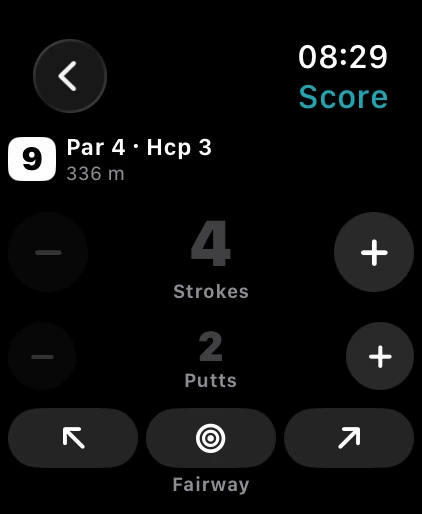
Count strokes, putts and sand shots with plus and minus; the scorecard of every hole is a swipe away. Play the round on your iPhone and the watch shows the same round, kept in sync. Play with the watch alone and the round comes to your iPhone afterwards, with the scorecard and your handicap.
- Strokes, putts, sand shots
- Scorecard of every hole
- The round lands on your iPhone
Automatic
The next hole comes by itself.
Finish the green, reach the next tee and the watch changes the hole with a short tap on your wrist. Pick a hole by hand and it stays until you have walked 30 meters on. You can turn the automatic change off under More. Your watch face and the Smart Stack show the hole, distance and strokes without opening the app.
- Hole change by GPS, can be turned off
- A short tap on the wrist
- Your round on the watch face
How it works
- 1
Pick a course
On your iPhone or right on the watch, nearby or by name.
- 2
Start a round
Choose your tee. On the tee, the watch knows which hole you are on.
- 3
Play
Read the distance, read the green, enter your score. The next hole comes by itself.
Questions, answered
Do I need my iPhone on the course?
No. The watch uses its own GPS. It gets its courses through your iPhone; after that the round runs on the watch alone and comes to your iPhone with the scorecard after you finish.
What does the Apple Watch cost?
Your first round on the watch is free. After that the watch comes with every DeepSwing plan, that is Coach, Launch Monitor or Complete, or you take just the Apple Watch GPS plan. Golf GPS on the iPhone is free.
Which Apple Watch do I need?
An Apple Watch with watchOS 11.5 or later, and an iPhone with iOS 17 or later with DeepSwing installed. The display is biggest on an Apple Watch Ultra.
Does the same round run on the iPhone and the watch?
Yes. Start the round on your iPhone and the watch shows it with its own GPS, with score and hole kept in sync on both. You can also play with the watch alone.
Does the watch help with swing analysis too?
Yes. At the range, the Apple Watch runs DeepSwing Coach from your wrist: start recording, Live Coach and Multi Capture while the iPhone sits on its tripod.
More about golf GPS
New in DeepSwing 3.4
One app. Three areas.
- AI CoachUnderstand your swing.Film your swing and the AI shows your Swing Score, 20+ checks, swing plane and clubhead speed in seconds. Plus the one drill that fixes your biggest fault.7-day free trial
- Launch MonitorMeasure every shot.Put your iPhone on a tripod and hit real balls: ball speed, launch angle, direction, carry and total for every shot. Then it flies on the range or on 12,000+ real courses.5 free shots every week
- Golf GPSPlay your course.Distances to the front, middle and back, bunkers and water, a 3D green heat map and a scorecard with handicap. On 12,000+ courses, on your Apple Watch too.Free on iPhone
Play your next round with the watch.
Get DeepSwing, open the watch app, tee off. Your first round is free.
Coming soon Google Play
DeepSwing is one app for all of it: AI swing analysis, a launch monitor and golf GPS. Golf GPS for Android and Wear OS is coming as an update to the same app.