

iPhone
Your iPhone is a golf swing analyzer.
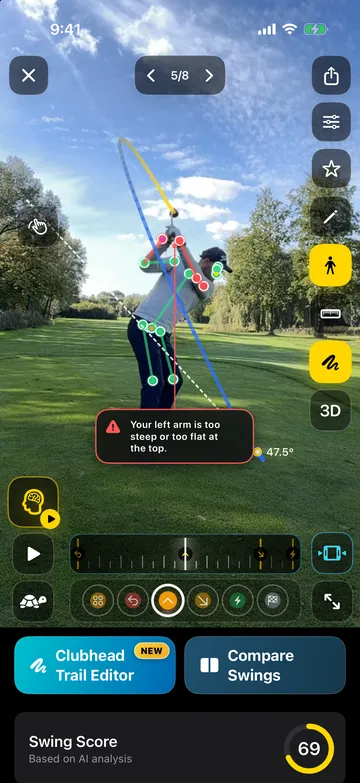
DeepSwing uses the camera and chip you already carry. The core analysis runs right on your iPhone, Apple Watch becomes the remote, and widgets and Live Activities show your score and round without opening the app.
- 4.6 ★on the App Store
- iOS 18+supported
- 0video uploads for analysis
- 18languages
On device
The analysis runs on your iPhone.
Pose and clubhead detection run right on the iPhone. Your swing videos are not uploaded for the analysis, and you need no signal on the range.
- Core analysis on device
- No video upload
- Record slow motion or import
Apple Watch
Apple Watch is your remote.
Put the iPhone on a tripod and run everything from your wrist: recording, countdown, Live Coach and Multi Capture. On the course you start rounds, change holes and trigger the next recording.
- Start recording and Live Coach
- Control golf rounds
- Complications and haptics
Lock Screen
Your round on the Lock Screen.
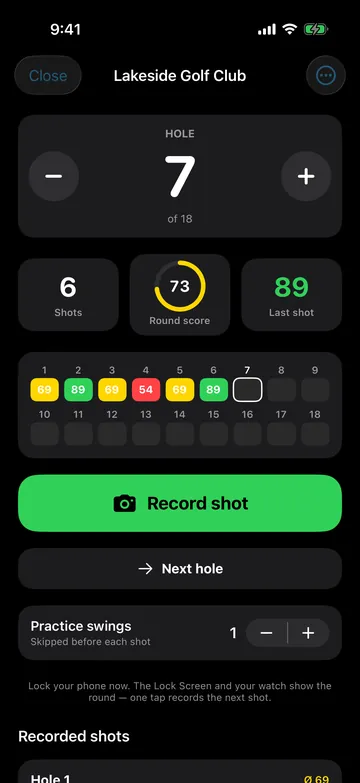
Live Activities show the hole, recorded shots and Swing Score on the Lock Screen and in the Dynamic Island. One tap opens the camera for your next shot.
- Live Activity and Dynamic Island
- Camera with one tap
- The camera stays off between shots
Widgets
Your golf on the Home Screen.
Widgets show Swing Score, last swing, training focus, streak, round and clubhead speed, and take you into capture or the coach with one tap.
- Score, streak, focus, speed
- Quick actions
- Round widget
How it works
- 1
Get it on the App Store
Install, pick language and handedness, done.
- 2
Set up and film
With the capture guide or hands-free from Apple Watch.
- 3
Review on iPhone
Phases, checks, speed and score in seconds.
What golfers say
4.6 out of 5 · 126 App Store ratings
-
★★★★★ App Store
A really great app!
I use DeepSwing at every practice session on the driving range alongside my pro. The analysis really helps me understand my swing, check changes right away and put what I have learned into practice. What I find especially helpful is that I no longer train by feel alone but get concrete feedback. …
IronLady66 · Germany · Translated from German -
★★★★★ App Store
New update is great
The performance is excellent. The reworked Live Coach and the video player in particular are much clearer now and work smoothly. The other features are a great addition too and run reliably. …
Taguchi91 · Germany · Translated from German -
★★★★★ App Store
Game changer!
I have been using this app for several months and it has helped me so much. … One of the things I like most is that I can experiment with different grips or moves and see the impact immediately. … I have never hit the ball better and my consistency has improved dramatically.
JMDOS · Canada ·
Questions, answered
Which iPhones work with DeepSwing?
iPhones with iOS 18 or later. The newer the iPhone, the faster the analysis runs.
Do I need an Apple Watch?
No. Apple Watch is optional: with it you control recording, Live Coach and golf rounds from your wrist.
Does DeepSwing upload my videos to the cloud?
No, not for the analysis. The core analysis runs on the iPhone. Only what you export yourself is shared.
Can I use slow-motion videos from the Camera app?
Yes. Import them from your library. Slow motion helps especially with the speed estimate.
How is this different from a launch monitor?
A launch monitor measures the ball. DeepSwing shows the movement that creates the ball flight: posture, rotation, swing plane and clubhead path. It also estimates speed from the video.
Related topics
- Apple Watch Golf CoachRecording, Live Coach and golf rounds from your wrist.›
- Android Swing AnalyzerThe full analysis on Android, with 120 and 240 fps on supported devices.›
- AI Swing AnalyzerBody and clubhead in every frame, 20+ checks, one clear priority.›
- Swing Speed AppClubhead and ball speed from video, with history per club.›

Turn your iPhone into a swing coach.
Get DeepSwing on the App Store. Try Pro free for 7 days.